
Auto Sign-in Automation for Web Tasks
Overview
The software is designed to automate web sign-in processes, enabling users to complete daily logins without manual input. By leveraging script-based automation, it eliminates the need to enter credentials or extract cookies repeatedly. The tool supports integration with browser-based workflows, allowing users to maintain access to frequently used websites with minimal effort. It is particularly suited for individuals managing multiple online accounts or performing repetitive tasks across web platforms.
Target users include productivity-focused professionals, web task managers, and automation enthusiasts who rely on consistent access to web services. The software operates as a desktop application compatible with Windows, Mac, and Linux, offering a cross-platform solution for users seeking streamlined workflows. Real-world scenarios include automating access to loyalty programs, educational portals, or internal company systems that require daily logins.
While the developer’s background is not provided, the tool has evolved through multiple updates since its initial release, with recent enhancements focusing on improved script handling and compatibility. The latest version, 1.1.1, includes support for domain wildcard matching, allowing broader coverage across subdomains such as *.baidu.com. This functionality enhances flexibility when managing scripts for large-scale automation tasks.
Key Features & Capabilities
- Script-Based Automation – Users can add custom scripts to automate sign-in processes without modifying browser settings. This enables precise control over login sequences and task execution.
- Domain Wildcard Support – Version 1.1.1 introduces support for wildcard domains like *.baidu.com, which automatically matches subdomains such as xxoo.baidu.com or www.baidu.com, improving scalability across related sites.
- External JS and Cookie Access – The tool allows scripts to load external JavaScript files and retrieve cookies from specified websites, enabling dynamic data handling during automation.
- Origin Header Support – Added in version 1.0.9, this feature ensures compatibility with sites that validate request origins, preventing access issues during automated sessions.
- Parameter Input for Login – Users can input login parameters such as username and password directly within the script, supporting scenarios where automated login is required.
- Notification and Redirect Handling – Scripts can now trigger notifications when a site is offline and automatically redirect to the login page, improving reliability during outages.
- Performance Optimization – Updates have addressed issues related to popup loading speed and program deadlocks, ensuring smoother operation during extended use.
These features collectively support complex automation workflows, such as daily sign-ins for reward programs or access to restricted content. The ability to manage multiple domains and handle dynamic content makes it suitable for advanced users seeking robust, reusable automation solutions.
User Interface, Workflow & Performance
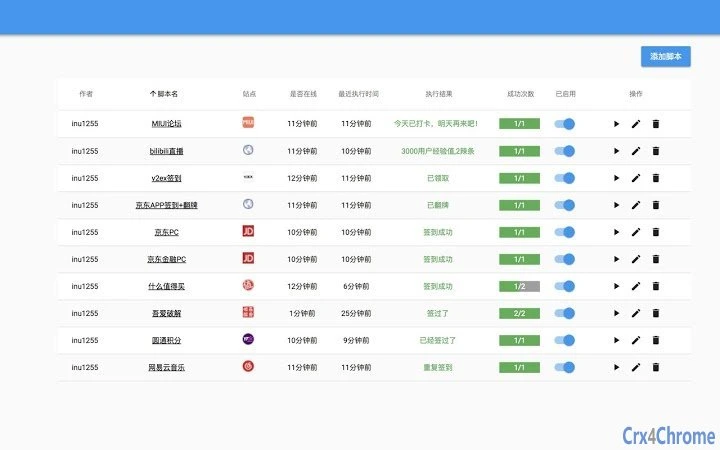
The user interface is designed around a minimalistic layout, focusing on script management and task execution. Navigation is straightforward, with dedicated sections for script configuration, domain settings, and execution logs. Users can add, edit, and test scripts directly within the application, with real-time feedback on execution status.
Workflow efficiency is enhanced by the ability to define scripts once and reuse them across multiple sessions. The tool runs in the background, requiring only a single login per session, after which automated sign-ins occur seamlessly. This reduces repetitive actions and saves time over extended periods.
Performance observations are based on general software behavior patterns. The application is lightweight, with a file size of 1.2 MB, suggesting low resource consumption. However, exact performance details such as CPU or RAM usage were not specified. The developer did not provide additional system requirements, and stability during long-running tasks is assumed to be maintained due to bug fixes in recent updates.
Compatibility & System Requirements
The software is compatible with Windows, Mac, and Linux operating systems, offering broad cross-platform availability. It is designed to function as a desktop application, integrating with web browsers through script execution rather than direct browser modification.
Version 1.1.1 was released on April 28, 2019, and the application size is 1.2 MB. While the tool supports script automation across various web environments, specific hardware requirements were not listed. The developer did not specify minimum processor speed, RAM, or disk space needs. Compatibility information is limited to the operating systems mentioned.
Installation is straightforward, with no complex setup steps reported. Users can launch the application and begin configuring scripts immediately after installation.
Pros and Cons
Pros
- Eliminates repetitive manual sign-ins with script-based automation
- Supports domain wildcard matching for broader script coverage
- Allows external JS and cookie access for dynamic automation
- Lightweight at only 1.2 MB in size
- Free to use with no licensing fees
- Regular updates with bug fixes and new features
Cons
- No detailed system requirements provided
- Performance metrics such as CPU or RAM usage not disclosed
- Developer background and company information not available
- Interface details not described beyond basic layout
- Dependent on external scripts, requiring user knowledge of scripting
FAQ Section
Is this software compatible with all web browsers?
The software is designed to work with web browsers through script execution, but specific browser compatibility was not detailed. It operates as a desktop tool that integrates with browser workflows.
Is the software safe to use?
As a desktop automation tool, it runs locally and does not transmit user data over the internet unless specified in scripts. Users should ensure scripts are from trusted sources to maintain security.
How often are updates released?
Updates have been released periodically since the initial version, with the latest update in April 2019. The frequency of future updates is not specified.
What type of license does it use?
The software is available for free, with no license fees. The exact license type was not provided.
Can I use it offline?
Yes, the software operates as a desktop application and does not require an internet connection to run once installed. Scripts can be executed offline, though some scripts may require online access to complete tasks.
Final Thoughts + CTA
This automation tool offers a powerful solution for users seeking to streamline repetitive web sign-ins. Its script-based architecture, combined with domain wildcard support and external resource integration, makes it a versatile choice for productivity and task automation. While some technical details are limited, its lightweight design and free access make it accessible to a wide audience.
It is particularly beneficial for professionals managing multiple online accounts or those who rely on daily access to web-based services. The consistent updates and focus on stability demonstrate a commitment to usability, even without detailed public documentation.
Download Auto Sign-in Automation Tool now







